I started caring about PDF invoice plugins the same way I start caring about most things: a client got audited.
Their accountant called them on a Tuesday morning. The store had been running for three years. They needed organized invoice records going back to day one. What they had was a folder full of random order confirmation emails, a half-functional invoice system that stopped working after a WooCommerce update, and no consistent numbering.
I spent the next two weeks reconstructing their invoice history by hand. It was miserable.
That experience taught me something simple: PDF invoice plugins are not exciting, and nobody wakes up excited to configure them. But the moment you need proper documentation, whether for taxes, audits, or just basic professionalism, you either have it or you spend days fixing the mess.
This article is the breakdown I wish had existed when I started managing WooCommerce stores at scale.
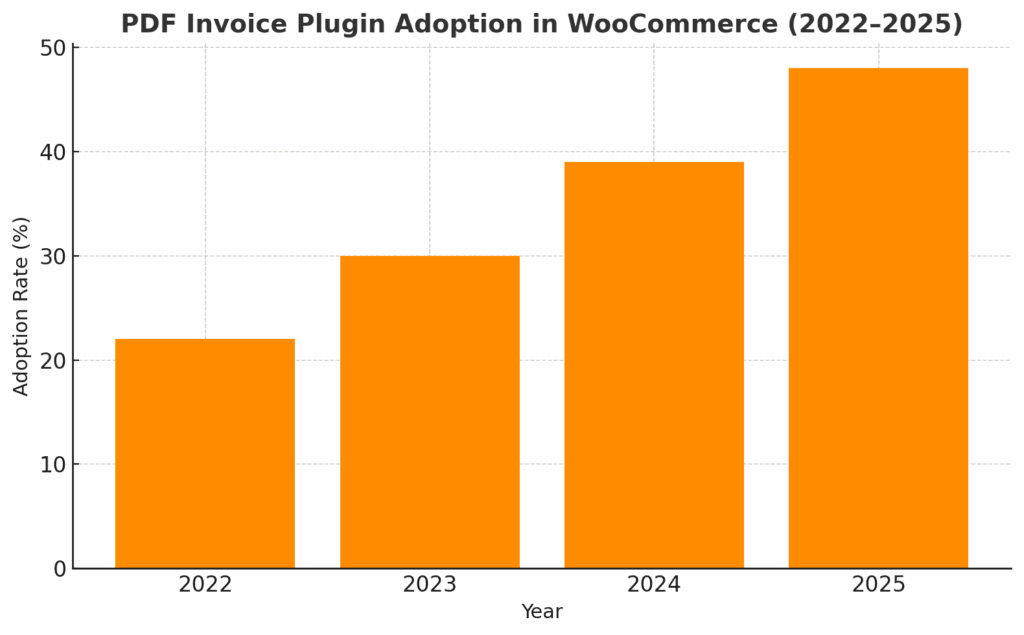
I’ve created this bar graph to show the simulated adoption trend of PDF Invoice Plugins in WooCommerce from 2022 to 2025. The steady growth reflects what I’ve seen firsthand: automation and compliance needs are driving more and more store owners to adopt these plugins.
Why I Actually Use PDF Invoice Plugins (Beyond The Obvious Stuff)
The basic pitch for invoice plugins is always the same. Automation. Branding. Compliance. Those are all true, but they miss the real value.
Here is what matters to me after running hundreds of WooCommerce sites:
- Consistency. Every order generates the same format, with the same numbering system, following the same rules. No gaps. No duplicate numbers. No “I forgot to send that one” situations.
- Evidence. When a customer claims they never got an invoice, or a payment processor wants proof of transaction, I have a paper trail that lives in multiple places. The invoice is attached to their order email, stored in the admin, and backed up to cloud storage if I set it up right.
- Less support noise. Customers can download their own invoices from their account page. They do not email asking for copies. That alone saves hours every month.
- Audit readiness. Tax season happens whether you are ready or not. Sequential numbering, proper VAT fields, and downloadable records in bulk make the process significantly less painful.
The automation part is excellent. But the real win is never worrying about whether your documentation is compliant when someone official comes asking.
What I Look For In A WooCommerce Invoice Plugin
Most invoice plugins look identical in feature lists. They all claim customization, automation, and professional templates. The differences show up when you actually use them.
Here is what separates the plugins I recommend from the ones I avoid:
- Customization that actually works. I want control over templates without writing custom PHP. Logo, colors, layout, and footer text. If I need to hire a developer just to change the invoice design, the plugin failed.
- Reliable automation. Invoices are attached to order emails based on status. I set it once, and it works every time. No manual downloads unless I want them.
- Bulk everything. I need to generate or download 50 invoices at once during tax prep. Plugins that make me do this one order at a time are dead to me.
- Sequential numbering with control. Legal compliance in most countries requires sequential invoice numbers. I want to set the starting number, add prefixes, and guarantee no gaps or duplicates.
- Multi-language support if you sell internationally. Customers expect invoices in their language. Plugins that only support English are non-starters for global stores.
- Clean tax and currency handling. VAT, GST, sales tax. Multiple currencies. The plugin needs to handle this without breaking or requiring manual fixes.
- Compatibility with the tools I already use. If it conflicts with my shipping plugin or my accounting software, it does not matter how good the features are.
The plugins that check these boxes are the ones still installed and working two years later. Everything else gets replaced after the first frustration.
The Invoice Plugins I Have Used And What I Think About Them
I have tested most of the major WooCommerce invoice plugins over the years. Some of them are great. Some of them should not exist. Here is the breakdown.
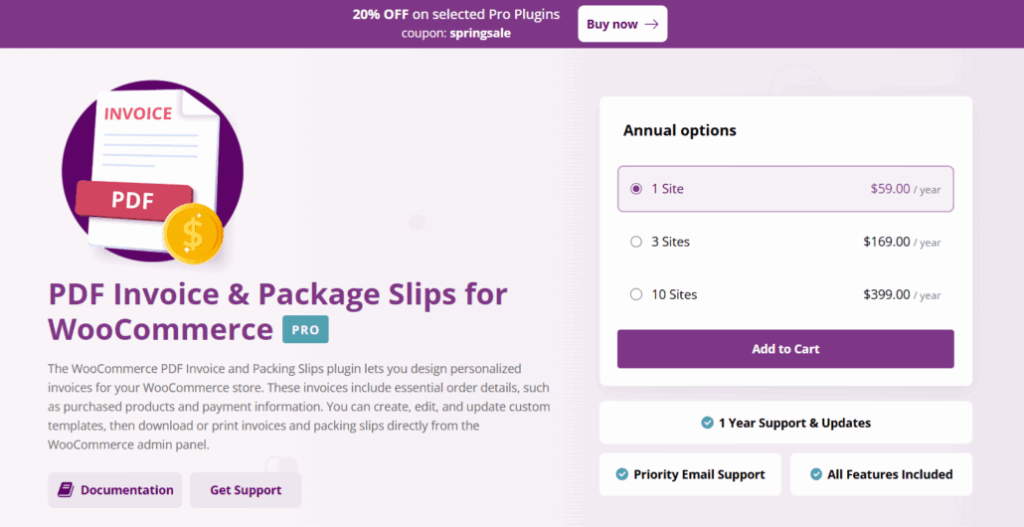
WooCommerce PDF Invoices & Packing Slips by Bright Plugins
This is the one I built, so yes, there is bias here. But I built it specifically because the other options annoyed me in consistent ways.
It handles invoices, packing slips, and shipping labels. You add your logo, set your invoice number format, customize the layout with either simple toggles or complete template editing, and it works.
What it does well:
- Custom templates without touching code. You get toggle controls for most layout changes, or you can edit the complete template for deeper control.
- Manual invoice number management. You set the starting number. You control the format. It does not randomly skip numbers or duplicate them.
- Shipping label generation is built in. Most plugins make you add another tool for this.
- Priority support that actually responds. I answer emails myself, usually within 24 hours.
What it does not do:
- No free version. It is premium only, with annual licensing.
- Limited automation on the email side. It generates and attaches invoices, but if you want scheduled delivery or complex automation workflows, you need to build that separately.
If you want a tool that does exactly what it says, with clear documentation and fast support, this is the one. If you want something free to test the waters first, keep reading.
Challan – PDF Invoice & Packing Slip for WooCommerce
Challan is solid for automation. It generates PDFs based on order status, supports bulk downloads, and handles multiple paper sizes, including A3, A4, A5, and Letter formats.
The customization is good. You can adjust layouts with built-in options or add custom CSS if you know what you are doing. It supports multilingual setups through WPML, Polylang, and similar plugins, which is critical for international stores.
Where it works:
- Full automation. PDFs attach to emails when the order status changes. Set it once and forget it.
- Bulk processing. You can export large batches of invoices or packing slips in one go.
- Global-ready. Multi-language and multi-currency support is baked in.
Where it falls short:
- The free version limits you. Advanced features like custom paper sizes and credit notes require upgrading to Pro.
- Support can be slow on the free tier. If you hit an edge case, expect to wait or upgrade.
It is a strong option if you need automation and do not mind paying for the Pro version when your store scales.
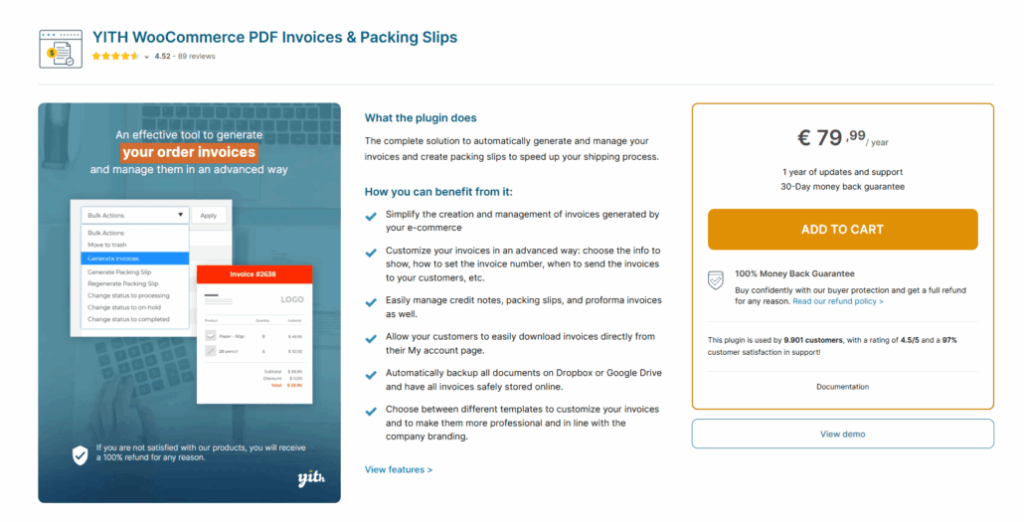
YITH WooCommerce PDF Invoice & Shipping List
YITH goes beyond basic invoicing. It handles invoices, credit notes, pro forma documents, delivery notes, and packing slips. If you need comprehensive documentation for complex fulfillment workflows, YITH has you covered.
The plugin includes a Gutenberg-based template builder, which gives you visual control over layouts. It also supports cloud backups to Dropbox or Google Drive, which is rare and valuable for compliance.
Strengths:
- Comprehensive document types. You get pro forma invoices, credit notes, packing slips, and delivery notes with shipping weights, all in one plugin.
- Advanced customization. The Gutenberg builder lets you design detailed templates without code.
- Cloud integration. Automatic backups to Dropbox or Google Drive keep your records safe.
- VAT and legal compliance. It includes checkout fields for VAT and SSN, supports electronic invoicing in regions such as Italy, and handles tax requirements effectively.
Weaknesses:
- Premium pricing for the best features. The free version exists, but cloud backup, the Gutenberg builder, and pro forma documents require the paid version.
- Complex setup. The number of options can overwhelm new users. Expect a learning curve.
- Annual licensing. You need to maintain your license to receive updates and maintain compatibility.
If your store has complex invoicing needs or you operate in regions with strict tax requirements, YITH is worth the investment. For simple setups, it might be overkill.
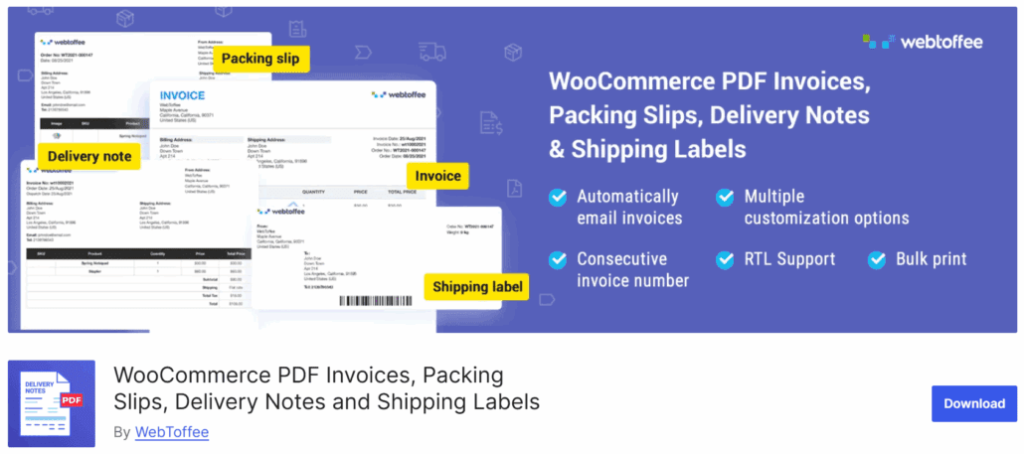
WooCommerce PDF Invoices Plugin by WebToffee
WebToffee’s plugin covers a lot of ground. Invoices, packing slips, shipping labels, delivery notes, and dispatch labels. It generates everything from the WooCommerce order page and automatically attaches invoices to order emails.
The template customization is flexible. You can add logos, VAT info, barcodes, and tracking numbers. It supports UBL and XML invoice formats for compliance in specific regions.
What works:
- All-in-one approach. One plugin handles most document types you need for order fulfillment.
- Bulk processing. Generate and print multiple documents at once, which speeds up packing and shipping.
- RTL and multi-language support. If you serve international customers or operate in right-to-left languages, WebToffee handles it.
What does not work as well:
- Add-on complexity. Some features, like UBL/XML or RTL support, require installing additional free or premium add-ons.
- Occasional bugs. Support forums mention issues with bulk printing or template errors. Most get fixed, but expect some troubleshooting.
- Learning curve. The breadth of functionality takes time to configure correctly.
WebToffee is a good middle option if you need more than basic invoicing but do not want the full weight of something like YITH.
Flexible PDF Invoices for WooCommerce & WordPress
Flexible PDF Invoices is free and surprisingly capable. It uses Gutenberg blocks for template design, supports VAT compliance, handles sequential numbering, and works with multilingual setups through WPML.
The free version includes most core features. You can manually issue invoices, download them in bulk, and manage VAT exemptions and OSS/MOSS rules for EU compliance.
Pros:
- Actually free. The core plugin is fully functional without requiring a paid upgrade for basic use.
- VAT and EU compliance. Handles VAT numbers, tax rates, reverse-charge workflows, and OSS rules.
- Gutenberg-based design. Visual template builder makes layout changes intuitive.
Cons:
- No automation in the free version. Automatic invoice emailing requires upgrading to Pro.
- Limited support. Free users get community support only. Technical help and advanced features require the paid version.
- Occasional bugs. Some users report issues with editing invoice details or displaying the logo in specific hosting environments.
If you want to test invoice automation without spending money upfront, Flexible PDF Invoices is a solid starting point. Upgrade to Pro when you need automation or better support.
How I Set Up Invoice Plugins Without Breaking Things
Installing an invoice plugin is easy. Configuring it correctly takes more thought.
Here is the process I follow every time:
- Update everything first. Before installing any plugin, I make sure WooCommerce, WordPress, and all other plugins are up to date. Compatibility issues surface quickly when versions mismatch.
- Brand it immediately. I add the store logo, colors, and footer details right away. Customers notice inconsistent branding, and it makes the store look unprofessional.
- Configure legal requirements. I check local tax regulations and make sure the invoice includes everything required. VAT numbers, tax rates, business registration details. Miss one field and you risk compliance issues later.
- Set up cloud backups. If the plugin supports Dropbox or Google Drive integration, I enable it. Local storage is fine until the server crashes.
- Test on real orders. I place test orders in different scenarios. Digital products, physical goods, taxed and tax-exempt, multiple currencies if applicable. I verify that invoices generate correctly in every case before going live.
- Enable customer downloads. I make sure customers can access their invoices from their account pages. This reduces support requests and gives them the records they need.
The key is testing before launch. Most invoice issues surface during setup, not months later. Fix them early.
How To Pick The Right Invoice Plugin For Your Store
Your choice depends on your store size, order volume, and the complexity of your invoicing needs.
If you run a small store with basic invoicing needs, start with a free plugin like Flexible PDF Invoices. Test the features. Upgrade when you need automation or support.
If you need strong customization and global support, Challan or WebToffee works well. They handle multi-language, multi-currency, and branding without requiring custom code.
If you have complex fulfillment or strict compliance requirements, YITH is the answer. It covers every document type, integrates with cloud storage, and handles advanced tax scenarios.
If you want reliability and fast support without complexity, use Bright Plugins. It does invoices, packing slips, and shipping labels with straightforward controls and priority support.
Consider these factors:
- Order volume. High-volume stores need bulk processing and automation. Low-volume stores can get by with manual generation.
- International sales. If you sell globally, multi-language and multi-currency support are non-negotiable.
- Legal requirements. Some countries require specific invoice fields or formats. Make sure the plugin supports them.
- Integration needs. Check compatibility with your shipping, accounting, and ERP tools before committing.
- Growth potential. Pick a plugin that scales with your store. Switching later is possible, but annoying.
What You Should Remember
PDF invoice plugins are boring until you need them. Then they become critical.
The right plugin automates documentation, keeps records organized, and ensures compliance without adding work to your day. The wrong one creates gaps in your numbering, breaks during updates, or forces you to generate invoices when you have 200 orders to fulfill manually.
Here is what matters:
- Automate invoice generation so you never manually create another invoice unless you want to.
- Customize templates with your branding to look professional and consistent.
- Ensure compliance with local tax and invoicing regulations before you get audited.
- Support bulk actions if you handle high order volumes or need records for tax season.
- Use sequential numbering to avoid legal issues and keep records organized.
- Choose multi-language and multi-currency support if you serve international customers.
- Plan for growth by picking a plugin that evolves with your business needs.
Why I Built Bright Plugins (And Why You Might Want To Use It)
I built Bright Plugins because every invoice plugin I used had issues. Either the customization was weak, the numbering system was unreliable, or support was nonexistent when something broke.
The WooCommerce PDF Invoice & Packing Slips plugin I created does invoices, packing slips, and shipping labels with simple toggles or complete template editing. You control invoice numbering manually, so you never get gaps or duplicates. Priority support responds in under 24 hours because I handle it myself.
It is premium only, with annual licensing. No free version. But it works reliably, scales with your store, and does not surprise you with missing features when you need them most.
If you want a tool built by someone who manages hundreds of WooCommerce sites and understands what actually breaks in production, check out Bright Plugins at brightplugins.com.